



Barebone Mini PC Shuttle Barebone slim XB860G2 SO-DDR5 black
Цена и описание
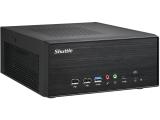
кликнете на снимката за голям размер


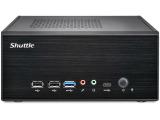
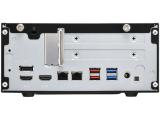
|
Производител/асемблер: ShuttleМодел: Barebone slim XB860G2 SO-DDR5 black
|
ЦЕНА: 413.42 €*
Срок за доставка: 7-10 дни!


цена без ДДС: 344.52 €*
* Цените са в евро. Актуализация: 27-09-2026 |
Доставката за град София е БЕЗПЛАТНА!
Защо да купите Shuttle Barebone slim XB860G2 SO-DDR5 black от нас?
- Защото цените ни са едни от най-добрите на пазара;
- Защото имаме реални магазини за компютри, в които можете да ни намерите по всяко време;
- Защото имате истинска гаранция, при това към нас!
 Поради голямото количество компютърни части и компоненти цените и наличностите им няма как да бъдат обновявани ежечасно, и поради тази причина, е възможно актуалните цени и наличности за конкретен наш магазин да се различават от посочените. Препоръчваме Ви да ни потърсите при интерес към Shuttle Barebone slim XB860G2 SO-DDR5 black !
Може да поръчате Shuttle Barebone slim XB860G2 SO-DDR5 black и посредством куриер. Работим с Еконт, като доставка до техен офис в страната е на по-ниска цена отколкото доставка до адрес.
На фокус: Shuttle Barebone slim XB860G2 SO-DDR5 black
Приложение
 интернет
текстообработка
снимки
музика
филми ( TV качество )леки игри
аудиообработка
интернет
текстообработка
снимки
музика
филми ( TV качество )леки игри
аудиообработка фотообработка
филми ( HD качество )
видеообработка
фотообработка
филми ( HD качество )
видеообработка
 игри
игри
Операционна система: no OS
Гаранциите на компютрите и компютърните конфигурации са по ваш избор: Могат да бъдат 2 години на компютъра (когато изрично не е упоменат друг гаранционен срок), или покомпонентна (ако компютъра е с асемблес SofiaComputers).
Гаранциите на различните монитори са различни според марката и модела, но не по-малко от 24 месеца ( 2 години ).
Спецификации на Barebone Mini PC Shuttle Barebone slim XB860G2 SO-DDR5 black 887993008134
Shuttle Barebone slim XB860G2 SO-DDR5 black, 887993008134, XB860G2
XPC slim XB860G2: The new benchmark for expandable 4.7-litre PCs
The Shuttle XPC Barebone XB860G2 is a sophisticated 4.7-litre PC engineered to provide professional-grade expansion in an ultra-compact form factor.
Centred on the powerful LGA1851 socket for Intel Core Ultra 200 series processors (Arrow Lake-S), this platform delivers the high-performance computing required for demanding AI-driven tasks and intensive multitasking.
Its robust steel chassis features a cutting-edge PCIe Gen5 x16 dual-slot interface alongside an additional PCIe Gen4 x1 slot, offering unprecedented hardware flexibility for a device of this size.
Perfectly suited for diverse professional environments, the XB860G2 excels in high-resolution 8K video wall presentations, media production, and advanced edge computing.
By accommodating dual-slot graphics cards or specialised I/O hardware, it serves as a powerful workstation, industrial controller, or even a capable mid-range gaming system. With support for 96GB of DDR5 memory and triple-display outputs, it offers an ideal balance of next-gen performance and compact reliability.
- For Intel Core Ultra 200 series processors (LGA1851), max. 65W TDP
- Up to 96 GB dual-channel DDR5-5600 SO-DIMM memory
- Dual-slot expansion: 1× PCIe Gen5 x16 (supports cards up to 205mm) + 1× PCIe Gen4 x1
- Triple display support: 1× HDMI 2.1 (8K), 1× HDMI 2.0 (4K), 1× DisplayPort 1.4a (4K)
- High-speed networking: 1× 2.5 Gbit + 1× Gigabit Intel Ethernet
- Superior storage: 3× M.2-2280 NVMe (incl. 1× PCIe Gen5)
- Comprehensive I/O: 2× USB 3.2 Gen 2, 4× USB 3.2 Gen 1 (incl. 1× Type-C), 2× USB 2.0, 1× COM port
- Advanced heatpipe cooling system with dual 60mm fans for 24/7 operation
- Compact 4.7-liter steel chassis (23.7 × 20.0 × 9.5 cm LWH)
- Professional-grade 180W external power supply and VESA mount included

Equipped with a high-speed PCIe Gen5 x16 slot and an additional Gen4 x1 slot, this system offers remarkable flexibility for a chassis of this size. Whether you require a dedicated graphics card, high-speed networking, or professional AV capture hardware, the XB860G2 adapts to your specific workflow.

Engineering at its finest: despite its compact 4.7-litre volume, the G2 chassis provides ample room for dual-slot graphics cards. It comfortably accommodates high-performance GPUs with dimensions up to 205 × 120 × 45 mm, making it a powerhouse for creative and demanding applications.
- Slim chassis design, colour: black
- Dimensions: 237 x 200 x 95 mm (LWH) = ca. 4.5-litre
- Overall length including PCIe slot mounting and thumb screws: 250 mm
- Weight: 1.9 kg net, 3.5 kg gross
- Hole for Kensington Lock at the backpanel
- Operation position horizontal or vertical with the included VESA mount
- External 180 W power adapter (fanless)
- Input: 100~240 V AC, 50~60 Hz, max. 2.5 A
- Output: 19.5 V DC, max. 9.23 A, max. 180 W output wattage
- AC Connector with protective-earth contacts, cable length: 1.7 m
- DC Connector: 5.5 / 2.5 mm (outer/inner diameter)
- This system comes without operating system.
- It is compatible with Windows 11 and Linux (64-bit)
support
- Processor Socket LGA1851
- Supports Intel Core Ultra 200 series 9/7/5 processors
- Code name "Arrow Lake-S"
- Maximum supported processor power consumption (Base TDP) = 65 W
- Does not support the unlock-function of Intel K-Series processors.
- Up to 24 cores (8 Performance-cores and 16 Efficient-cores)
- Neural Processing Unit (NPU) with 13 TOPS AI-Performance
Processor cooling with heat-pipe technology and two fans (6cm)
/ /
- Mainboard in Mini-ITX form factor 17 x 17 cm
- Chipset: Intel® B860
- AMI BIOS in 32 MB EEPROM
- All capacitors are high quality solid capacitors
- Supports hardware monitoring and Watchdog functionality
- Supports Unified Extensible Firmware Interface (UEFI)
- Supports power on after power failure [1]
- Supports Firmware TPM v2.0 (fTPM)
support
- 2x SO-DIMM slot with 262 pins
- Supports DDR5-5600 (PC5-44800) SDRAM at 1.1 V
- Supports Dual Channel mode
- Supports a maximum of 48 GB per DIMM,
- maximum total size: 96 GB
- Note: Supports two unbuffered DIMM modules (no ECC or registered)
Integrated
- The features of the integrated Intel graphics function with Xe cores
- depend on the processor type used. [4]
- The PC features these graphics outputs:
- - HDMI 2.1 supports 8K UHD with max. 7680x4320 Pixel at 60 Hz (4320p60)
- - HDMI 2.0 supports 4K UHD with max. 4096x2160 Pixel at 60 Hz (2160p60)
- - DisplayPort supports 4K UHD with max. 4096x2160 Pixel at 60 Hz (2160p60)
- - optional one analog Sub-D/VGA port (optional Accessory PVG01)
- Supports up to four independent displays with the integrated graphics function.
- If the HDMI 2.1 port is operated with an 8K monitor, the second HDMI port cannot be used.
- DisplayPort and HDMI support multi-channel digital audio over the same cable.
- The pre-installed 90° Riser Card provides two PCI-Express expansion slots:
- 1x PCI-Express X16 Gen 5 slot
- 1x PCI-Express X1 Gen 4 slot
- Supports dual-slot (double-width) graphics cards (occupies the second PCI-Express slot)
- The used PCIe X16 expansion card must meet the following conditions:
- 1) Maximum dimensions: 205 mm x 120 mm x 45 mm
- 2) Maximum power consumption: 75 W (optional up to 225 W [8])
- For special purposes, the mainboard provides a 5V auxiliary voltage (max. 2 A) via 4-pin Molex connector.
Output
- Audio Realtek® ALC 888S High-Definition Audio
- Two analog audio connectors (3.5 mm) on the front panel:
- 1) 2-channel line-out (head-phones)
- 2) microphone input
- Digital multi-channel audio output: by HDMI and DisplayPort
Dual Controller
- Dual network with two RJ45 ports with two status LEDs each
- Used network chips:
- 1) Intel 226LM (left RJ45 port) supports 100 / 1.000 / 2.500 Mbps data transfer rate
- 2) Intel 219LM (right RJ45 port) supports 10 / 100 / 1.000 Mbps data transfer rate
- Supports WAKE ON LAN (WOL) [7]
- Supports network boot by Preboot eXecution Environment (PXE)
Three SSD slots
- Three M.2 2280M slots provides the following interfaces:
- - Slot 1: supports PCIe Gen4 x4 (NVMe) and SATA (max. 6 Gbps)
- - Slot 2: supports PCIe Gen4 x4 (NVMe) and USB3.2 Gen2 (max. 10 Gbps)
- - Slot 3: supports PCIe Gen5 x4 (NVMe) - access from the bottom side [9]
- It supports M.2 cards with a width of 22 mm and a length of 80 mm (type 2280).
- Use the supplied heat sink kit to install the M.2 SSD on the bottom side. [9]
M.2-2230E slot for cards
- Interfaces: PCI-Express Gen4 X1, USB 2.0 and CNVi
- Supports M.2 cards with a width of 22 mm and a length of 30 mm (type 2230)
- Supports WLAN expansion cards
- Optional Shuttle accessory: WLN-M1/M12 [3]
Panel connectors
- Microphone input
- Audio Line-out (headphones)
- 1x USB 3.2 Gen 1 Type A (max. 5 Gbps, blue)
- 1x USB 3.2 Gen 1 Type C (max. 5 Gbps)
- 2x USB 2.0 (black)
- Power button
- Power LED (blue)
- HDD LED (yellow)
Panel connectors
- 1x HDMI 2.1 (right side)
- 1x HDMI 2.0 (left side)
- 1x DisplayPort 1.4a [2]
- 2x USB 3.2 Gen 2 Type A (max. 10 Gbps, red)
- 2x USB 3.2 Gen 1 Type A (max. 5 Gbps, blue)
- 1x 2.5G LAN (RJ45 port, Intel 226LM chip)
- 1x Gigabit LAN (RJ45 port, Intel 219LM chip)
- 1x DC-input connector for external power adapter (supports 19.5V only)
- 1x 4-pin connector (2.54 mm pitch) supports:
- - external power on button (see optional accessory CXP01)
- - Clear CMOS function
- - +5V DC voltage for external components
- 2x Perforation for Wireless LAN antennas
- 1x Perforation for optional VGA port (optional Accessory PVG01)
- 1x Hole for Kensington Lock
onboard connectors
- Jumper J1 for power-on-after-power-fail (hardware solution) [1]
- Front connectors for power button, LEDs, USBs, audio ports
- 4-pin fan connectors (occupied by the CPU cooling system)
- SATA power connectors: 5V (4-pin) and 12V (3-pin)
- Header for an optional VGA port "VGA1" (optional Accessory PVG01)
- Multi-language installation guide (EN, DE, FR, ES, JP, KR, SC, TC)
- DVD with Windows 11 driver software and manuals in PDF format
- External power adapter with ca. 1.8m AC power cord (with protective-earth contacts)
- Protector cap for the CPU socket (do not use if heat-pipe or fan is mounted)
- CPU heatpipe cooling system pre-installed with heatsink compound
- Heat sink kit for SSD card with screws (for the M.2-2280 slot on the underside)
- supplied with four thermal pads, 20x70mm, in various thicknesses [9]
- VESA mount (metal) supports 75x75 and 100x100 mm VESA standard
- Four screws M3 x 5 mm (screws together VESA mount and PC)
- Four screws M4 x 10 mm (to affix VESA mount on the back of a monitor)
- Four screws (M3x5, silver) for installation of three M.2-SSDs and one WLAN card
Accessory
- - CXP01: adapter cable for external power button
- - PVG01: Adapter for a VGA port
- - WLN-M1/M12 (802.11ax, Wifi 6): WLAN module with two antennas [3]
- - WWN04: Adapter/Antenna kit for 4G/5G expansion card
- - PRC02: Expansion kit to support an additional power adapter (PE90 or PE180) for more powerful graphics cards [6]
Specifications
- Operating temperature range: 0~50°C [5]
- Relative humidity range: 10~90% (non-condensing)
and
- EMI: CE, UKCA, FCC, BSMI, RCM, VCCI
- Safety: CB 60950/62368, cTUVus, BSMI
- Other: RoHS, Energy Star, ErP
- This device is classed as a technical information equipment (ITE) in class B and is intended for use in living room and office. The CE-mark approves the conformity by the EU directives:
- (1) 2004/108/EC relating to electromagnetic compatibility (EMC),
- (2) 2006/95/EC relating to Electrical Equipment designed for use within certain voltage limits (LVD),
- (3) 2009/125/EC relating to ecodesign requirements for energy-related products (ErP)
[1] Power-on-after-power-fail:
The BIOS setup provides a "power-on-after-power-fail " function that can be found under "Power Management Configuration". As the name indicates, this function determines the PC's behaviour after power failure: (1) unconditional power on, (2) restore former status or (3) keep system turned off. As a matter of the nature of this function, it may fail after short power failures. This is why this PC also comes with a hardware-based solution. By removing the appropriate jumper JP1, the system will start unconditionally once power is supplied.
[2] How to convert DisplayPort into HDMI/DVI
The DisplayPort output supports Dual-mode (DP++) and can be converted to HDMI or DVI by an additional, passive adapter cable. For example:
DELOCK 82590: 1m, DisplayPort (male, 20p) to HDMI-A (male, 19p)
DELOCK 82435: 5m, DisplayPort (male, 20p) to DVI-D (male, 24p)
The integrated graphics automatically detects the connected display and puts out the appropriate electric signal - either DisplayPort (without an adapter) or HDMI/DVI (with an adapter). Please note that DVI/HDMI monitors are only operated in single-link mode, i.e. max. 1920x1200 with 60 Hz.
However, a monitor with a DisplayPort connector cannot be connected to the HDMI port with a simple, passive adapter.
[3] Optional Wireless LAN module:
This slim PC can optionally be upgraded with WLAN/Bluetooth functionality. Shuttle offers the suitable accessory kit WLN-M1/M12, consisting of a WLAN card in M.2-2230 format and two external antennas with appropriate antenna cables.
[4] Intel processors without integrated graphics (ID ends with "F", e.g. Core Ultra 7 265F) are not compatible.
[5] High ambient temperature
For high ambient temperature over 40°C we strongly recommend to use SSDs instead of hard disk drives.
[6] Expansion Kit PRC02
With the Shuttle XPC accessory PRC02 you can equip this PC with a second DC input to connect a second power adapter. This allows the use of even more powerful graphics cards. Graphics cards with 75W power dissipation are supported as standard. With an additional 90W or 180W power supply unit, this value increases to 150W or 225W.
[7] Note on the Wake-on-LAN function
Summary: Please use the 2.5G network connection for the WOL function.
Explanation: This PC has two network connections (LAN ports):
(1) 1.0G (Intel 219 chip)
(2) 2.5G (Intel 226 chip)
The PC supports the Wake-on-LAN function (WOL) to start the switched-off computer (from S5 mode) via the network. The following settings can be found in the ‘Advanced’ BIOS setup:
(1) Wake Up by LAN = Enabled (this activates WOL)
(2) Power-On after Power-Fail = Power On by LAN
The second setting defines the behaviour after a power failure – in this case, the PC should not switch on immediately as soon as power is restored, but should wait for the power-on signal via the network connection. However, after a power failure, switching on via the network (WOL) only works via the 2.5G network port for technical reasons. Do not use the 1.0G network port for the WOL function if you expect that the PC's power supply could be interrupted.
[8] Expansion Kit PRC02
With the Shuttle XPC accessory PRC02 you can equip this PC with a second DC input to connect a second power adapter. This allows the use of even more powerful graphics cards. Graphics cards with 75W power dissipation are supported as standard. With an additional 90W or 180W power supply unit, this value increases to 150W or 225W.
[9] M.2 slot on the bottom
There is a case cover on the bottom of the PC, under which there is a third M.2 slot for SSD cards in M.2-2280 format. Since this slot is not located in the airflow of the cooling fan (like the other two M.2 slots), this SSD card must be specially cooled. For this purpose, a two-piece heat sink kit with four 20 x 70 mm thermal pads in various thicknesses is included.
(1) Before installing the M.2 SSD card in the heat sink, a 1.75 mm thick thermal pad must be mounted at the top and at the bottom. If the SSD card is equipped with chips on both sides, then choose the 0.5 mm thick thermal pad for the bottom.
(2) After installing the SSD card in the M.2 slot, mount the 3 mm thick thermal pad on top to create a thermal bridge to the case cover.
Гаранционен срок: 24 месеца
* Ако производителя дава по-голям гаранционен срок, гаранцията се поема от производителя, след изтичането на гаранцията дадена от София Компютърс.
Limited lifetime е обозначение на гаранционен срок към производителя, след изтичането на дадената гаранция от София Компютърс ЕООД.
Поради факта, че клавиатурата и мишката са строго субективни като размер и дизайн, ние НЕ включваме такива в компютрите и конфигурациите!
Можем да ви подсигурим нови комплект клавиатура с мишка на цена под 20 €., но бихме предпочели да ги изберете сами.
Също така, не сме Ви избрали тонколони и/или слушалки, поради това, че вкусовете и нуждите на всеки потребител са строго индивидуални. Тонколонки и/или слушалки можете да си изберете в секция ЗВУК и АУДИО.
Ние се грижим за вашите компютри много след като сте ги закупили.
* София Компютърс не гарантира и не носи отговорност за непълна или грешно публикувана информация и снимки!
ФОРМА ЗА ОНЛАЙН ПОРЪЧКА

Вход | Регистрация
Вашата количка »
0 продукта
Телефони:
(позвънете ни)
ж.к. Младост
 0885-117-820
 08-76772852
или 08-popravka
ж.к. Лагера:
0887-736668
или 0887-remont
ж.к. Люлин:
(временно само на адрес) 0879-04-12-99
Viber:
 Магазин Младост
Магазин Лагера
Discord:
 sofiacomputers
 e-mail
 Контакти »
Работно време:
магазин Младост:
понеделник-петък:
10:30-19:30
събота: 14:00-18:00
магазин Лагера:
понеделник-петък:
10:30-19:00
магазин Люлин:
временно затворен!
(ще отвори)
Още предложения за Mini PC компютри
Ново
Инсталация, инсталиране на Windows 11 »
Преинсталиране, преинсталация на Windows 11 »
ремонт на таблети »
Почистване на PS5 »
Почистване на Xbox Series X, S »
поправка, ремонт и сервиз на телефони »
Интересно
Сглобяване (асемблиране) на компютри »
Хардуерни почиствания »

